Shopify cycle counting without closing your warehouse
A full stocktake can swallow a weekend. A steady cycle-counting routine keeps Shopify accurate while most of the warehouse carries on working.

# Cycle counting works best as a weekly habit
A full physical inventory means counting everything at once. For many shops that means pausing fulfillment, pulling people away from their normal work, and spending the next morning untangling a page of unexplained differences. You get a clean snapshot. Then receiving and picking start again, and the numbers begin to move.
Cycle counting spreads the work across the calendar. Count a small group of bins each week, investigate mistakes while the trail is still fresh, and work through the warehouse over time. Shopify can keep taking orders because only the bins in that day's count need to be left alone. Shopify's own cycle-counting overview makes the same tradeoff between recurring partial counts and a disruptive full count.
# Decide what gets counted before the shift
ABC counting is an easy place to start. Check fast-moving or expensive A stock every week, B stock each month, and the slow C range once a quarter. If you already ran an ABC analysis on Shopify order data , use those classes instead of making a second list.
Sales velocity is not the only way to choose. You can pull the bins that have gone longest without a count, take a random sample, or trigger a check after a failed pick. An odd return or an adjustment nobody recognizes is also a good reason to count now rather than wait for Friday.
For a small warehouse, a mixed schedule is usually easiest to live with. Give A items and long-neglected bins a fixed weekly slot, then add exception counts when something looks wrong. Keep the first schedule modest. Ten bins counted every Tuesday beats a perfect plan that lasts two weeks.
Inventory record accuracy: (correct records ÷ records counted) × 100. If 97 of 100
counted SKUs match, accuracy is 97%.
# A count that works while Shopify stays live
Choose the exact bins before anyone starts and finish any receipt, transfer, return, or pick that touches them. Then lock or mark those bins. The rest of the warehouse can keep moving, but a count is useless if somebody takes two units from the shelf halfway through it.
Have the counter record what is physically there without showing the expected quantity. When the screen says twelve, people have a funny habit of finding twelve. Count empty bins too. Confirming a zero can stop Shopify from selling stock that disappeared days ago.
Recount every mismatch with a second pair of eyes. Look in the neighbouring bins and check open picks, recent returns, receiving paperwork, and Shopify's adjustment history. Once you understand the difference, record a plain reason such as damage, a receiving mistake, or stock put on the wrong shelf. If you still do not know, say so rather than making up a tidy explanation.
Apply the confirmed count, unlock the bins, and let normal work resume. Keep the old quantity, the physical count, who checked it, and the reason for the change. Fixing the number protects today's orders. Remembering why it was wrong may prevent next week's mismatch.
# Measure accuracy without hiding the ugly bits
Inventory record accuracy is simply the share of counted records that match the shelf. If 97 of 100 variants are correct, accuracy is 97%. Follow that number over time, but break it down by Location or product class as well. A healthy warehouse average can hide a receiving corner that is wrong every week.
Keep an eye on the size of each difference too. One record that is wrong by 200 units is a different problem from three records that are off by one. The accuracy rate tells you how often the ledger is right. The size and cause of the mismatches tell you what to fix. The guide to Shopify inventory reconciliation explains how to close those differences without guessing.
# What usually ruins a count
Active picking ruins more counts than bad arithmetic. A worker removes two units after the counter has visited the bin but before the result is approved. Suddenly the shelf and the system disagree, even though both were right at different moments. Unprocessed receipts and returns cause the same race.
Showing the expected number on the first pass also nudges people toward it. Skipping empty bins, adjusting Shopify before a recount, and calling every difference shrinkage make the report look cleaner than the warehouse is. If the same area keeps failing, watch the work around it. Receiving may be rushed, returns may sit overnight, or overflow stock may never get a proper address. The article on phantom stock follows those small errors through to the cancelled order.
# How BinTech handles a bin count
Shopify keeps the sellable total for each Location, while the person doing the count is standing in front of a shelf. BinTech can start a count with the bins checked longest ago, fast-moving products, or a hand-picked group. Those bins lock while the count is open. Shopify changes only after somebody reviews and confirms the result.
The count uses the same bin records as the automated pick lists , so it checks the addresses and quantities workers rely on each day. If Shopify changes without a matching bin movement, the difference appears in variance reconciliation . A person can then decide which shelf gained or lost the stock.
Start with ten or twenty busy bins during a quiet part of the week. Review the differences and watch for the same cause appearing again. Add more bins once the routine feels boring, which is exactly what you want. The getting started guide covers the first BinTech setup. Pricing lists the current plan limits.
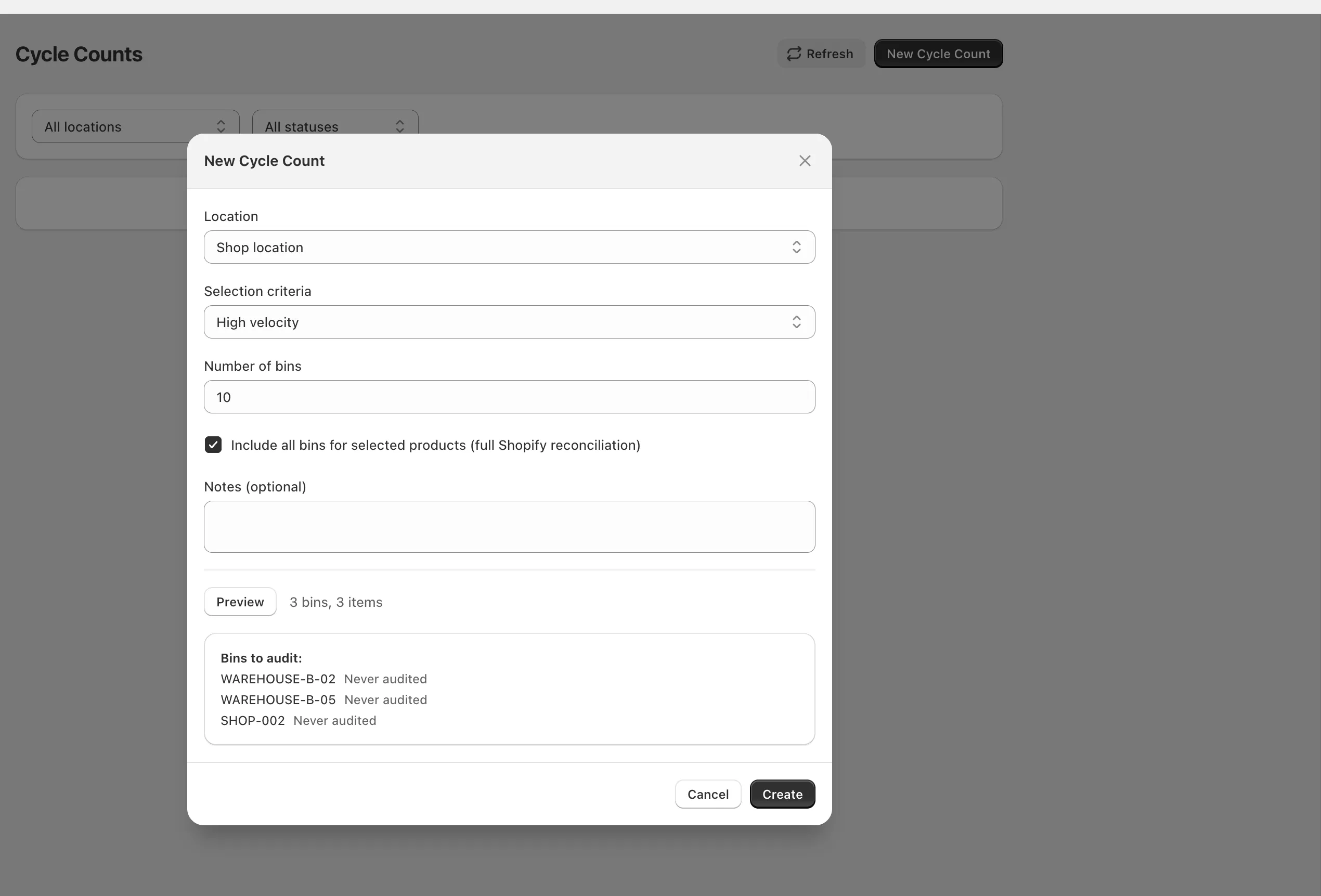
Select bins by count age, sales velocity, or manually, then review discrepancies before syncing a confirmed adjustment to Shopify.
# A weekly checklist you can actually use
Before the shift, choose the bins and finish any open movements that touch them. Lock the count area, hide the expected quantity, and record every physical count, including zero. Get somebody else to recount the differences before you investigate what happened and approve the adjustment.
Once the bins are open again, write down any cause that keeps returning. The routine does not need to be elaborate. It needs to happen often enough that an error is still recent and somebody remembers how it got there.
Frequently asked questions
How often should a Shopify store cycle count inventory?
A practical starting point is weekly for fast-moving or high-value stock, monthly for ordinary stock, quarterly for slow stock, and immediately after an unexplained variance or failed pick.
Do I need to stop Shopify orders during a cycle count?
Usually not. Isolate or lock only the bins being counted and finish movements that affect them. Other warehouse areas can keep receiving and fulfilling orders normally.
What should happen to open orders during a count?
Complete or clearly account for picks that reserve stock in the count area before counting. Do not let workers remove units from a locked bin until the count is confirmed.
How should I investigate a cycle-count discrepancy?
Recount independently, check adjacent bins and open picks, then review recent receiving, returns, transfers, damage, and Shopify adjustments. Record both the correction and the most likely cause.